Gigabyte GA-8AENXP-D – a Motherboard Based on Intel 925XE Chipset | | 
| ||


There currently appear an increasing number of motherboards based on the recently released and well-advertised Intel 925XE chipset. Motherboards on this chipset are very often practically no different from their i925X predecessors. The new motherboard from Gigabyte is not an exception. It looks very much like Gigabyte 8ANXP-D, except for the support of Intel Pentium 4 Extreme Edition and 1066 MHz FSB.
Gigabyte GA-8AENXP-D is the top model in the series for Intel processors, so it is bundled according to its high status and possesses corresponding functionality. I would like to note that the manufacturer laid stress on the functionality of the motherboard instead of on "bells and whistles": eight Serial ATA connectors — this is quite "capital" even for these days. We should also note a very good quality of the integrated audio, based on Realtek ALC880 HD Audio.
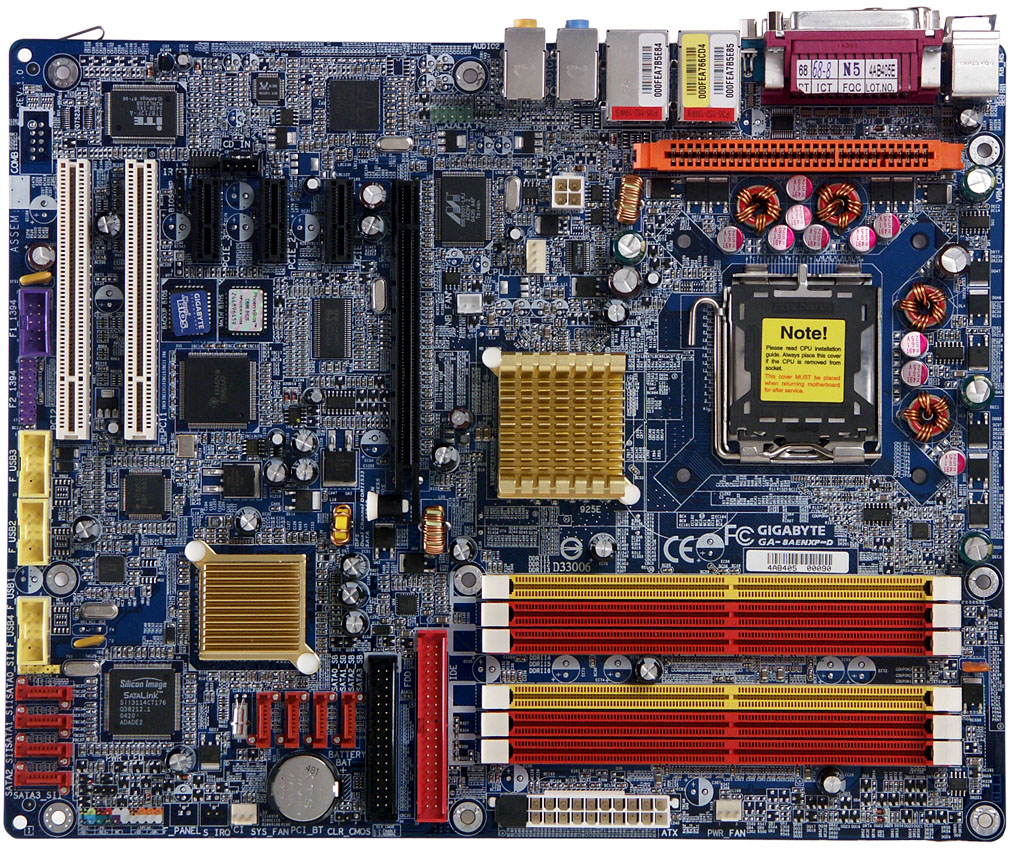
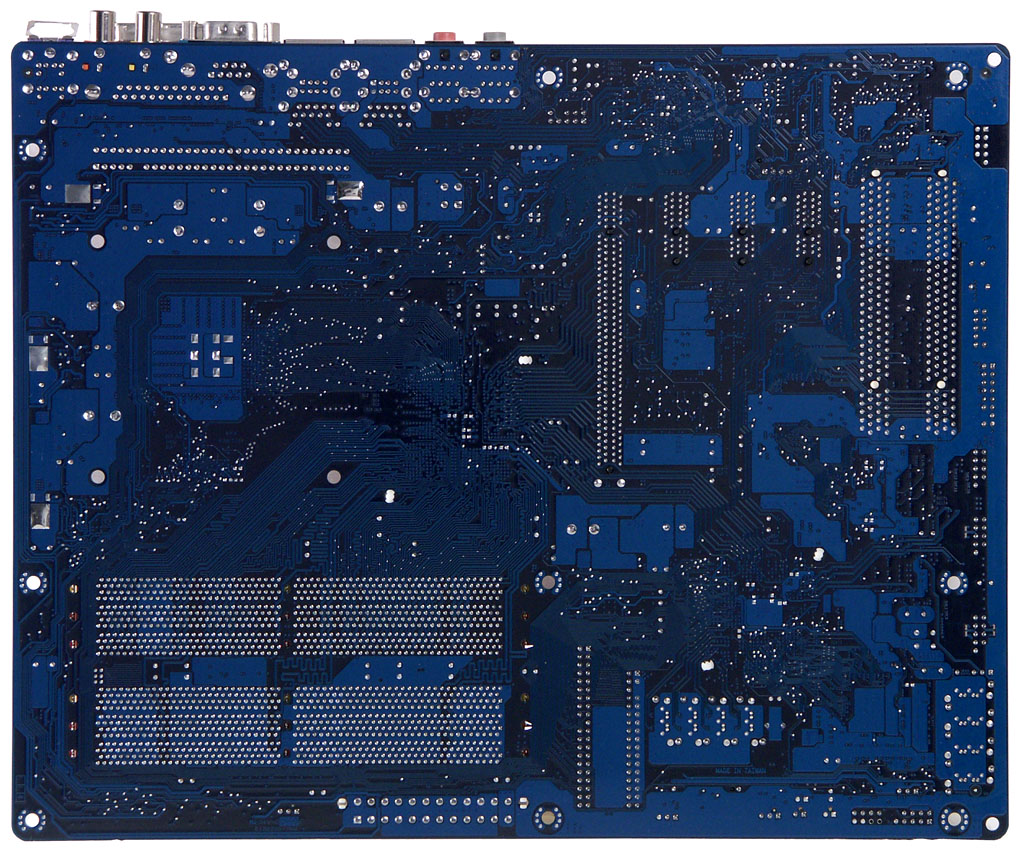
The PCB layout is ordinary — inconvenient placement of connectors along the left edge, FDD and PATA connectors are behind the video slot, the audio connector is in front of the PCI-E 1x slots. Access to the jumper is not hampered, when the motherboard is in a PC case, its description is provided on the PCB. The 4-phase switching voltage regulator of the processor incorporates two 1500 uF capacitors, four 1000 uF capacitors, and nine 560 uF capacitors. The PCB also contains voltage regulators for the PCI-E x16 bus (4 x 1000 uF) and for memory (6 x 1000 uF).
The PCB layout provides space for a COM port connector, which is left empty. Motherboard dimensions 305x245 mm ("wide" ATX, nine-screw mount, all motherboard edges are firmly fixed). System monitoring is performed by the ITE IT8712F-A chip.
System monitoring (ITE IT8712F-A)
- CPU and memory voltage, +3.3 and +12 V
- RPM of 3 fans
- CPU temperature (by the embedded CPU sensor)
- Board temperature (by the on-board sensor)
Onboard ports, sockets, and connectors
- Processor socket (Socket LGA775, for Intel Pentium 4, Prescott/Gallatin, Intel Celeron (Prescott), Pentium 4 Extreme Edition)
- 6 x DDR 2 SDRAM DIMM (differ by color, grouped by three)
- 1 x PCI-E x16 (with a latch)
- 3 x PCI-E x1
- 2 x PCI
- Power connectors: standard EPS 12 V (24 pins) and 4-pin connector for 12 V
- 1 x FDD
- 1 x IDE (Parallel ATA) — in the chipset
- 8 x SATA (Serial ATA), four of them are in the chipset, the other four are due to an additional controller
- U - Plus DPS connector
- 4 connectors for brackets with additional USB (2.0) ports
- 2 connectors for the bracket with additional FireWire ports
- 1 x CD/DVD audio connector
- 1 x standard IrDA connector
- Header for the bracket with additional Audio-Outs
- 4 x fan headers (3 of them offer RPM control, the fourth can be used for the fan on the northbridge heatsink).
Back panel (left to right, blockwise)

- PS/2 mouse and keyboard
- 1 x LPT, 1 x COM, Coaxial S/PDIF-In/Out
- 2 x USB and 1 x RJ-45 (Gigabit Ethernet)
- 2 x USB and 1 x RJ-45 (Gigabit Ethernet)
- 3 x Audio (Mic-In, Line-In, Front)
- 3 x Audio (Center/Sub, Rear, Side)
Package Contents


- Standard design package, two boxes with handles
- Documentation (in English):
- User's guide
- SATA RAID setup guide
- Poster with short instructions how to install and setup the motherboard
- Cables:
- ATA 66/100/133 (blue, with company logo)
- FDD (blue, with company logo)
- 8 x Serial ATA
- 4 x SATA power converters
- U-Plus DPS (additional VRM to increase operating stability, including overclocked modes)
- Fan for a northbridge heatsink
- WiFi 802.11b/g card with antenna
- Rear panel bracket with 2 x USB and 2 x FireWire
- Rear panel bracket with 2 x USB
- Rear I/O shield
- 2 CDs with software:
- Motherboard drivers
- drivers for the 802.11 b / g expansion board
- Adobe Acrobat Reader
- Norton Internet Security 2004
- Gigabyte @BIOS
- Gigabyte C.O.M
- Gigabyte DMIView
- Gigabyte EasyTune 5
- Gigabyte FaceWizard
- Gigabyte Windows Utility Manager
- Gigabyte IA Panel
- Gigabyte Management Tool
- DirectX 9.0b

Integrated Controllers
- Audio, based on HD Audio codec Realtek ALC880 supporting 7.1 channel audio, with front line-in/out and S/PDIF
- Network, based on Marvell 8001 chipset, supporting 10/100/1000 Mbit/sec (Gigabit Ethernet)
- Network, based on BROADCOM 5751 chipset, supporting 10/100/1000 Mbit/sec (Gigabit Ethernet)
- Silicon Image 3114 RAID (4 x Serial ATA supporting RAID: RAID 0, RAID 1, RAID 5, RAID 10, JBOD)
- Intel ICH6R (4 x Serial ATA supporting RAID: RAID 0, RAID 1, RAID 0+1, Matrix RAID)
The integrated audio quality was tested in 16bit, 44 kHz using the RightMark Audio Analyzer 5.4 test application and the Terratec DMX 6fire sound card:
| Frequency response (from 40 Hz to 15 kHz), dB: | | |
| Noise level, dB (A): | | |
| Dynamic range, dB (A): | | |
| THD, %: | | |
| Intermodulation, %: | | |
| Channel crosstalk, dB: | | |
General performance: Very good (details).
Proprietary technologies
- C.I.A.2 — dynamically changes CPU performance depending on the current CPU load
- M.I.B.2 — optimizes memory operation
- EasyTune 5 — a proprietary program that helps with overclocking
- Xpress — a proprietary program that helps restoring lost data.
- U-Plus DPS (additional VRM to increase operating stability, including overclocked modes)
Settings
| Jumpers and switches | Clear CMOS jumper | ||
| In Award BIOS v6.00PG | Memory timings | | |
| Memory frequency selection | + | Auto, DDR2-333, DDR2-400, DDR2-533, DDR2-600, DDR2-667, DDR2-711 | |
| AGP bus setup | | ||
| PCI-E bus setup | + | 100-130 MHz at 1 MHz steps | |
| PCI frequency divider setup | | ||
| PCI IRQ manual assignment | | ||
| FSB frequency setup | + | 100—600 MHz at 1MHz steps | |
| CPU multiplier | + | x 12 —x 13 | |
| CPU core voltage control | + | 0.8375-1.6 V at 0.125 V steps | |
| Memory voltage control | + | Normal, +0.1, +0.2, +0.3 V | |
| Chipset voltage control | | ||
| PCI-E bus voltage control | + | Normal, +0.1, +0.2, +0.3 V | |
We used BIOS 1.02F, the latest available BIOS version at the time of our tests.
Performance
Gigabyte GA-8AENXP-D demonstrates the best test results among the motherboards based on i925XE that we have tested. Differences between motherboards' test results are insignificant, so it's hard to say for sure which motherboard is faster. And, of course, a couple of seconds must not play a pivotal role when choosing one of these motherboards.
Conclusions
Gigabyte products have always been a model of reliability. The new GA-8AENXP-D motherboard is not an exception. Besides, this model can boast of almost ultimate functionality, excellent performance, and very good quality of integrated audio.
But there is still a fly in the ointment of Gigabyte GA-8AENXP-D: for some unknown reason our sample refused to operate well with DDR2 Corsair XMS2 DDR2 PRO modules, so we had to replace them with XMS2 DDR2 TWINX. Considering very good performance results of this product in our tests, it will be logical to assume that it's a "price of speed", sort of: perhaps, some default timing values are a tad too "aggressive" (we traditionally use BIOS Optimal Defaults + By SPD in our tests, that is the settings used by the majority of users).
References
- Official Gigabyte web site
- Russian Gigabyte web site
- The motherboard page on the official web site
- The motherboard page on the Russian site
- Tests with this motherboard: N/A so far
- Other motherboards based on a similar design: N/A
-
- The motherboard is kindly provided by the manufacturer
 |
Stephen Cooper, March 9th, 2003

Processor
Chipset Memory Internal I/O Connector Expansion Slots Rear Panel Form Factor |
)
)
As far as external expansion brackets go, the GA-7VAXP Ultra could easily fill up your PCI slots if you so chose to utilize each of the available expansion brackets. Yes, there is indeed that many. First off we have the GC-SATA card. This card is equipped with two rear SATA connections, along with a rear SATA power connector. On the “front” of the card, there are two more SATA connectors along with a Molex power connector. To complete the SATA package, Gigabyte also includes a Molex adapter for those power supplies without the proper SATA device power connectors. This adapter allows for use of two SATA devices. There is also a single SATA cable included in the package of the GC-SATA card. The next expansion bracket we come across is the three-port IEEE1394a bracket. Each of these ports has their own connector on the motherboard as we’ll see later in the review. The next expansion bracket is for USB 2.0 support. This bracket is outfitted with four USB 2.0 ports and requires two connectors on the motherboard for use of all four ports. The last expansion bracket is for the onboard audio. This bracket provides support for rear and sub/center channels for your speaker system. It also features the S/PDIF digital out connector, and the RCA connector. All in all, we have four, yes four expansion brackets!
The remainder of the GA-7VAXP Ultra’s package includes items such as two Serial ATA cables, the GA-7VAXP Ultra user manual, a SATA RAID Function manual, a Promise RAID Function manual, a special rear I/O bracket to allow for the positioning of the rear I/O ports, one lengthy floppy ribbon cable, three ATA/133 ribbon cables, and of course the driver / software CD. Many times in the past we have seen manufactures throw in support for RAID, yet they always seem to skimp out on the cables they provide in the package. Needless to say with two Serial ATA cables and three ATA/133 cables, Gigabyte has clearly supplied everything you’ll need for the GA-7VAXP Ultra.
If you read our review of the GA-8IEXP a few months back, you may remember that we were initially unimpressed with the included user manual that was provided by Gigabyte. It ran over several areas very nicely, but if you wished to learn more about the BIOS you had to go online in order to find out about settings. To quote myself, “The user manual that is included with the GA-8IEXP is rather poor as it fails to cover any of the real BIOS settings.” Well, the GA-7VAXP Ultra manual does not face the same plight as did the GA-8IEXP’s. The manual that is included with the GA-7VAXP Ultra clearly goes over the BIOS settings is great detail, and still retains all of the detailed setup instructions that the GA-8IEXP manual featured. Gigabyte also includes nicely detailed instruction manuals for setting up both a regular RAID Array, and a SATA RAID Array through two separate manuals.
The driver / software CD houses the drivers and software for the KT333 and KT400 based Gigabyte motherboards, so if you’re looking to find a driver, this would be the place to do it. When you first insert the disc into your CD-ROM, the main window will pop up right to the driver install window. Here, you simply click which drivers to install and you’re good to go. The next window that’ll be important is the Utilities window. Here you’ll be able to install all of the third party software, and Gigabyte’s own software onto your system. The included software suite is very nice, and unlike the last time, I was able to get the Easy Tune overclocking program to work. One of the nicer inclusions within the software package is that of Norton Internet Security. This software package includes the likes of Norton Anti-Virus, Personal Firewall, Parental Controls, etc. Gigabyte has also chosen to include their Windows-based BIOS writer, along with a basic system monitoring utility. Overall the Gigabyte GA-7VAXP Ultra comes along with nothing less than an exceptional package.
The GA-7VAXP Ultra doesn’t skimp out on features; in fact it matches the exceptional package. This motherboard is the new king of the hill for both package quality and amount of features, for the time being. The GA-7VAXP Ultra comes along with a Realtek 8100BL Ethernet 10/100Mb LAN Controller, Promise PDC20276 RAID controller, Realtek ALC650 6-Channel Audio Codec, Silicon Image Sil3112A SATA RAID Controller, VIA VT6306 IEEE1394a Controller, along with support for USB 2.0 and other items through the KT400 chipset. Let’s take a better look at each of these chips, and then head on to the motherboard layout.
| Gigabyte 8INXP (Granite Bay) Motherboard : Intro and Specs |
| ||||||||||||||||||||
|


No comments:
Post a Comment